12 MAY 2026 · 19 MIN READ
computer use agent story
a cua (computer use agent) is just an llm that controls a browser. you give it a task like "log into some saas dashboard and screenshot the encryption settings", it takes a screenshot, sends the screenshot to claude with a list of tools (click, type, scroll), claude returns a tool call like click(x=420, y=180), you apply that to the browser, take another screenshot, and loop. that's the whole thing. it's a while not done: screenshot → llm → tool call loop with a real browser on the other end.
the part that's not obvious is where the browser actually runs. it can't run on the user's laptop (you'd need them online and giving you access). it can't run on your api server (you'd be sharing one chrome between every request). so it has to run on a remote linux box somewhere, with chrome inside it, and your backend talks to that chrome over the network. that "remote linux box with chrome" is the whole infra problem. everything else — the prompts, the planner, the auth, the recording — is built around that one primitive.
what you'll take away
quick pointers so you know what to look for as you read:
- a cua is just a screenshot loop. screenshot → llm → tool → screenshot. everything else is plumbing.
- the hard part is "where chrome runs." rented browser apis are easy; raw vms are powerful but you build the stack yourself.
- you don't need to invent a remote desktop. xvfb + x11vnc + novnc has been doing this since the 90s.
- auth =
storage_state, not oauth. capture cookies once, replay forever. - bot detection isn't really solvable. proxies + atomic typing + bail on captchas, that's it.
- a
Computerprotocol with ~10 methods is the seam that lets you swap providers without rewriting the agent. - traditional unit tests are theatre for agents. trace everything, benchmark periodically, manually verify on real flows.
- scaling = retuning gunicorn, not magic. long timeouts, worker recycling, locked + shielded cleanup, pre-warmed templates.
the screenshot loop, slightly less hand-wavy
claude (and openai's models, and gemini) ship "computer use" tools — basically a function spec that says "i can call click(x, y), type(text), scroll(direction) etc." you wire that up like any other tool call. the whole loop is maybe 15 lines of pseudocode:
async def run_task(task: str, browser: Computer):
    history = []
    for turn in range(MAX_TURNS):
        screenshot = await browser.screenshot()
        response = await claude.complete(
            task=task,
            screenshot=screenshot,
            tools=COMPUTER_TOOLS,   # click, type, scroll, ...
            history=history,
        )
        if "<<TASK_COMPLETE>>" in response.text:
            return response
        tool_call = response.tool_use         # e.g. click(x=420, y=180)
        await browser.execute(tool_call)      # applied to chrome via cdp
        history.append((screenshot, tool_call))
quick aside on <<TASK_COMPLETE>> — that's not a magic constant from anthropic. it's just a sentinel string you put in the system prompt: "when you're done with the task, output the literal text <<TASK_COMPLETE>> followed by a one-line summary." the model emits it, your loop greps for it, you break. could be [DONE], doesn't matter — pick something the model is unlikely to output by accident. same trick for the captcha bail-out later: prompt says "if you see a captcha, output <<TASK_COMPLETE>> with reason CAPTCHA."
that's it. the model is doing all the perception (where's the button? what does the screen say?) and all the planning (what do i click next?). you're just the hands.
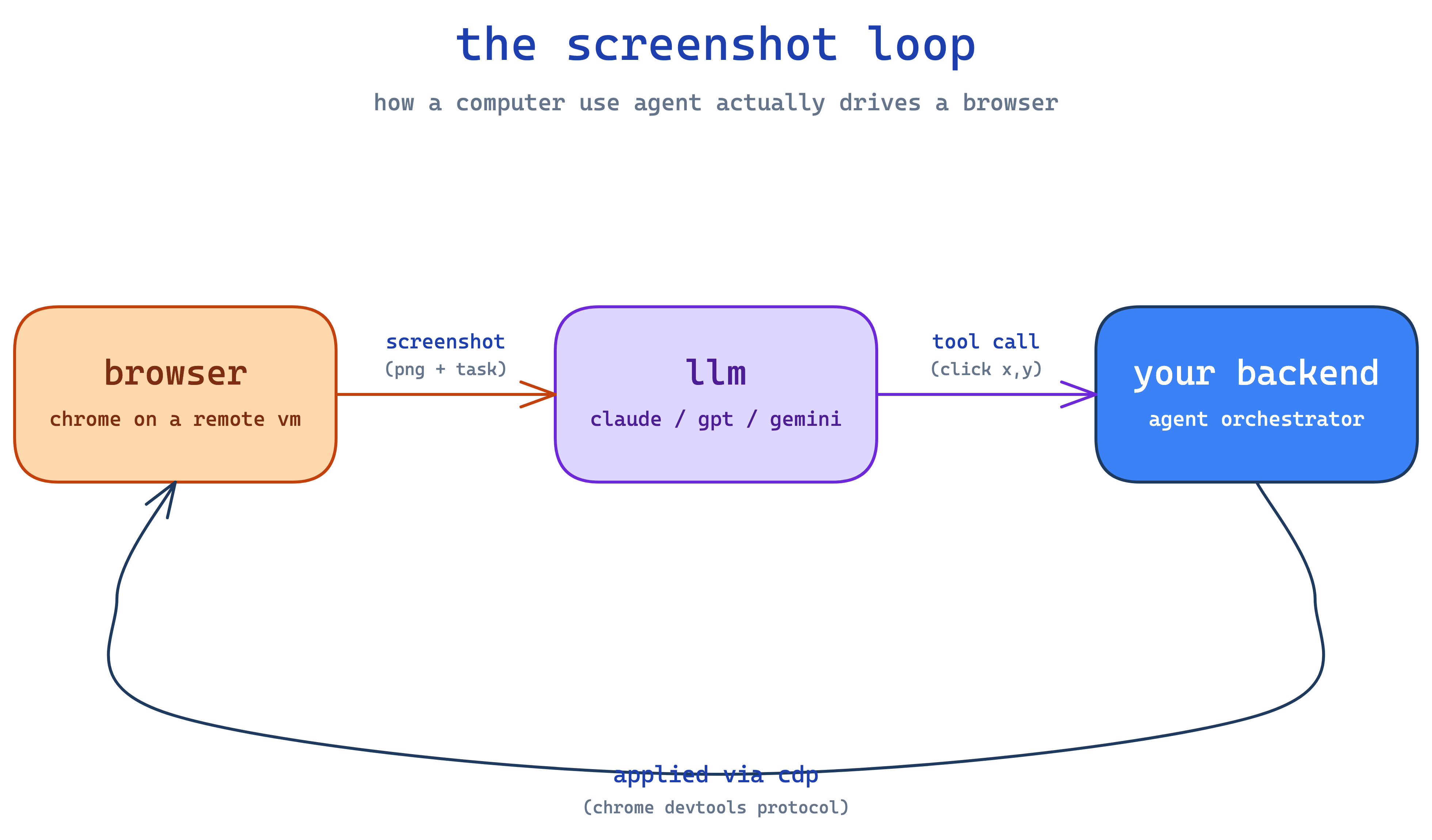
you might ask, tautik — what drives the browser? playwright. python library that speaks cdp (chrome devtools protocol — same thing your devtools panel uses when you press f12). when chrome launches with --remote-debugging-port=9222, anyone with the websocket url can connect and drive it — click, type, screenshot, run js, intercept network. so your backend does await playwright.chromium.connect_over_cdp(url) and from then on it's as if the chrome is on your laptop, except the actual browser is on a vm somewhere.
✽ RECALL in the cua loop, what is your code responsible for vs the model — and how does the loop know when to stop?
the model does all the perception (what's on screen) and all the planning (what to click next); your code is just the hands — apply the tool call to chrome over cdp, screenshot, send it back, loop. termination is a sentinel string you define in the system prompt ("output <<TASK_COMPLETE>> when done") that the loop greps for — nothing magic, and the same trick handles the captcha bail-out.
where chrome runs — the actual hard problem
aight so two paths.
option 1: rented browser-as-a-service. vendors like browserbase give you back a cdp_url and a stream_url and call it a day. their problem to figure out where chrome runs and how to keep it alive. easy day one. cost: they decide which features get exposed (recordings? proxies? auth storage?) and how their pricing scales. you get whatever they ship.
option 2: raw linux vm + install chrome yourself. services like e2b give you firecracker-as-a-service — AsyncSandbox.create() returns a root vm with commands.run(), files.read/write, port exposure. no browser, no display, no vnc, no recording. you trade up on control, you trade down on convenience.
most teams should start with option 1. you'll know when it's time to move down a layer — usually when you keep hitting the vendor's ceiling on something (recording, proxies, custom flags, snapshot timing). don't migrate prematurely; you're signing up for a stack you now own end to end.
✽ RECALL rented browser-as-a-service vs raw vm with chrome — when is it time to move down a layer, and what do you sign up for?
start rented; migrate only when you keep hitting the vendor's ceiling on something you need — recording, proxies, custom chrome flags, snapshot timing. the raw vm hands you a root box and nothing else: no browser, no display, no vnc, no recording. you trade up on control and sign up to own the entire stack end to end, so don't do it prematurely.
the remote display stack, demystified
if you go option 2, here's what you actually need on the vm. linux servers don't have monitors, but chrome (when not running headless) wants to draw to a screen. so:
xvfbis a fake screen — gives chrome anx11display in ramxfce4is a window manager that puts borders and a taskbar around chrome's windowx11vncwatches the fake screen and rebroadcasts it asvnc(a 90s screen-sharing protocol)novnctranslates the vnc stream into websockets so a normal browser tab can render it without any plugin (i wrote a deeper novnc walkthrough here if you want to actually understand what's happening over the wire)
so the chain looks like:
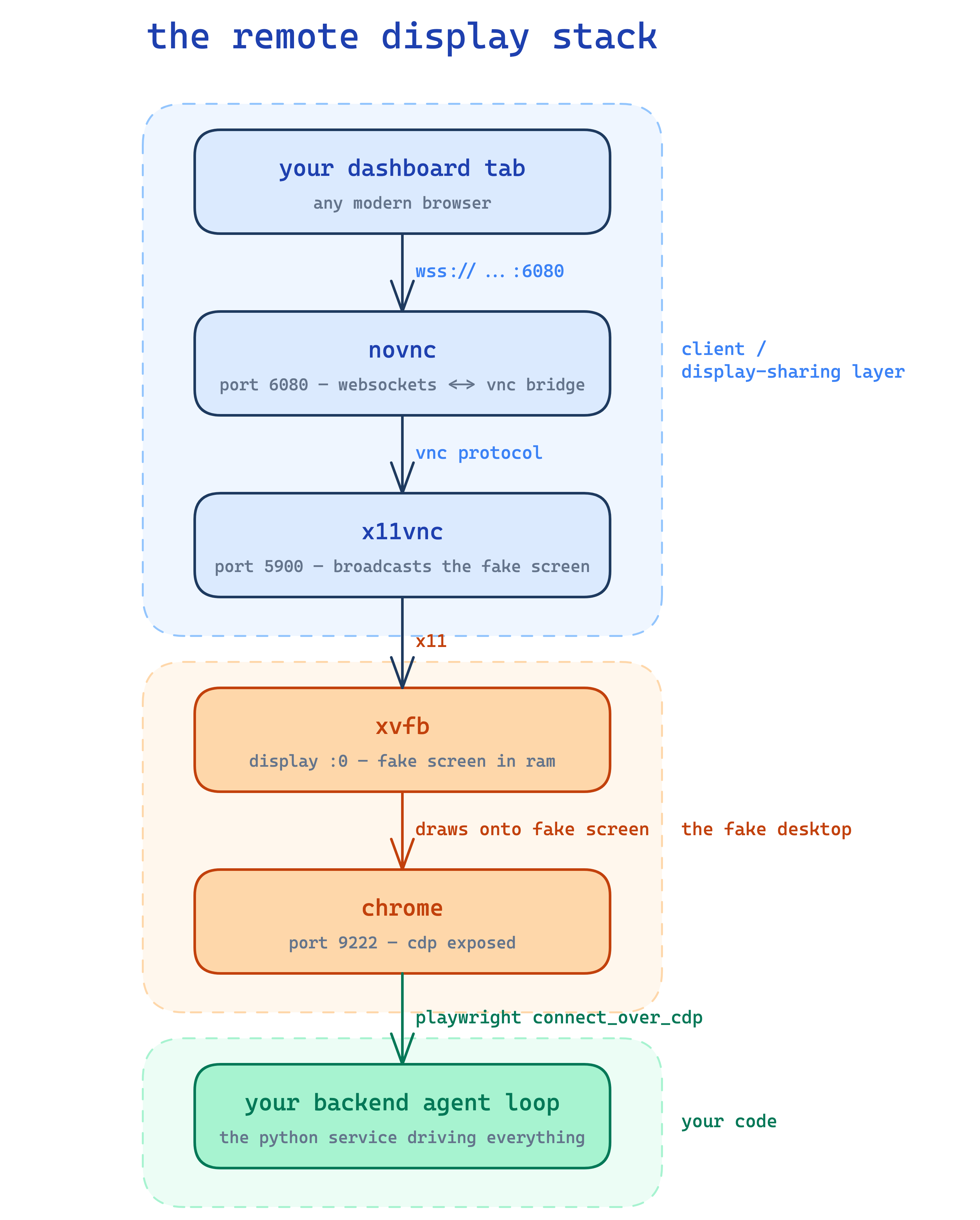
none of this is novel — vnc has been around forever and people have been remote-debugging headless linux for two decades. the only thing you have to do is orchestrate the startup order (xvfb → xfce → x11vnc → novnc → chrome) and wait for cdp to respond on port 9222 before the agent connects.
apt install xvfb xfce4 x11vnc novnc chromium-browser and you're ~80% there. there are even pre-built ubuntu templates floating around with all of this preinstalled, which saves a lot of fiddling.
✽ RECALL chrome on a headless linux vm needs a screen to draw on, and you need to watch it from a browser tab. what's the chain, and why is none of it novel?
xvfb fakes a display in ram, xfce4 puts a window manager around chrome, x11vnc rebroadcasts the fake screen as vnc, and novnc translates vnc into websockets a browser tab can render. all of it is decades-old remote-desktop tech — your only real work is the startup ordering (xvfb → xfce → x11vnc → novnc → chrome) and waiting for cdp to answer before the agent connects.
the Computer protocol — the small trick that buys you everything
this is the smartest 30 lines of code you'll write. before introducing it, your agent loop will have provider-specific calls baked in — vendor.start_browser(), vendor.click() — and swapping providers later means a rewrite.
so define a typing.Protocol called Computer with the methods the loop actually uses — screenshot, click, type, scroll, keypress, drag, wait, move, double_click, get_environment, get_dimensions. the loop calls those. anything that implements those methods is a valid Computer.
class Computer(Protocol):
    async def screenshot(self) -> bytes: ...
    async def click(self, x: int, y: int) -> None: ...
    async def type(self, text: str) -> None: ...
    # ... ~8 more
VendorAClient is a Computer. RawVMChromeWrapper is a Computer. tomorrow if you want a third provider, that's another Computer. the loop doesn't know or care. and you can mock a Computer with 30 lines for a unit test.
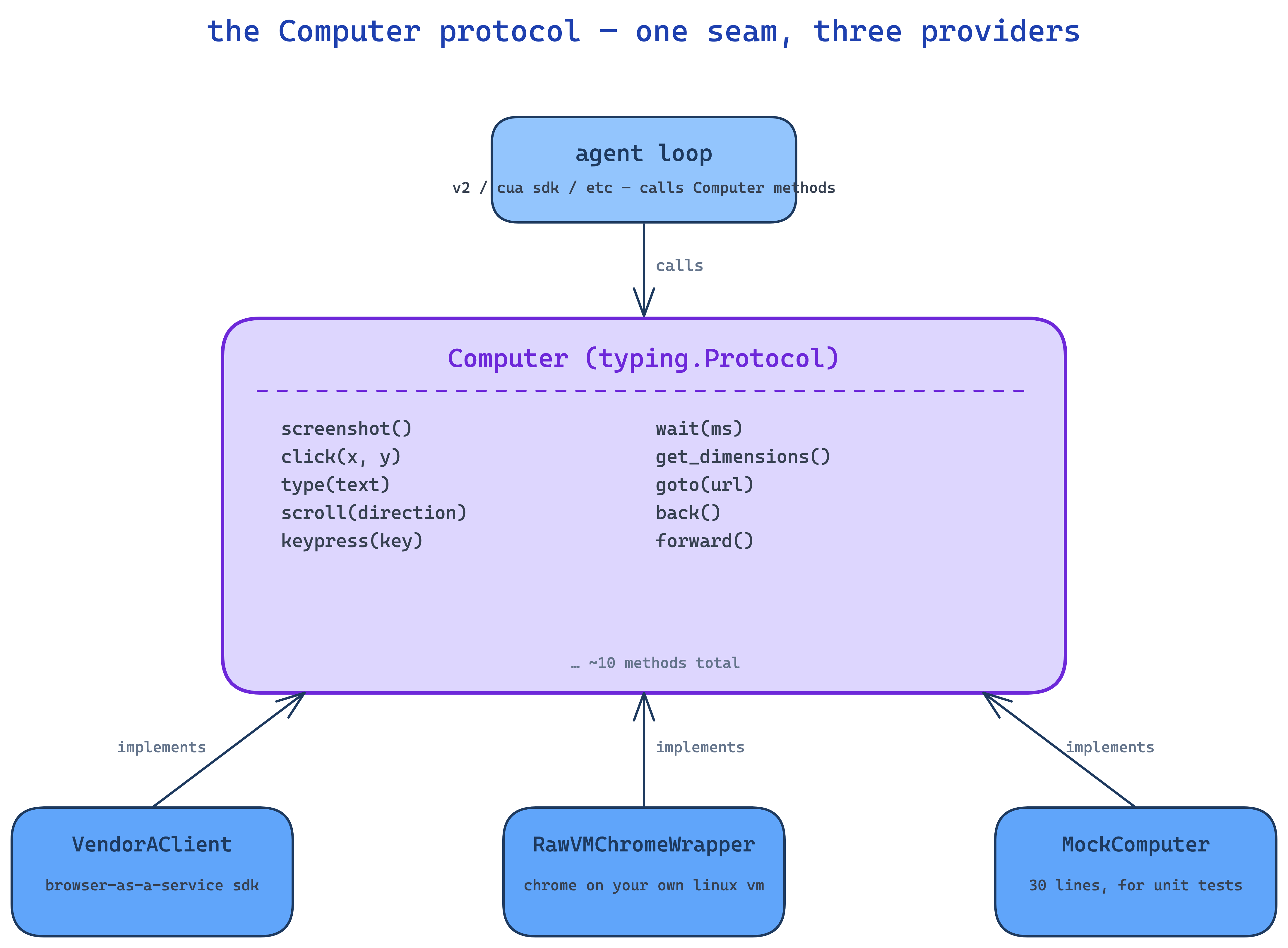
this is just the strategy pattern with python's structural typing. nothing fancy. but it's the difference between "ship a new provider, swap a factory" and "rewrite the agent."
✽ RECALL what does the Computer protocol buy you, and why structural typing instead of an inheritance hierarchy?
the loop only ever calls ~10 methods — screenshot, click, type, scroll, and friends — so anything implementing them is a valid Computer: a vendor client, a raw-vm wrapper, a 30-line mock for tests. swapping providers becomes a factory change instead of an agent rewrite. structural typing means providers never need to know about your base class; the protocol is just the seam where they plug in.
the stuff you actually have to write
ok so the vm is up, chrome is running, the loop is talking to it. what's still left?
auth
big one. when a user says "log into my snowflake instance and pull the audit logs" — how does the agent log in?
you don't do oauth. trying to script through "sign in with google → enter password → 2fa" with an llm is a nightmare and most enterprise saas blocks it as suspicious activity anyway.
what you do instead is capture once, replay forever. once, during auth setup, a real user logs in interactively while watching a vnc stream of your vm. when they confirm "yes i'm logged in", you call playwright's context.storage_state() which returns a json blob of cookies + localstorage + sessionstorage. you store that json (encrypted, scoped to the org). every future task that needs that platform pulls the json and injects cookies + storage into a fresh playwright context. the user appears already logged in. no oauth, no passwords stored, no refresh token handling.
if the customer's site uses oauth (sign in with google), the user does the dance once during capture and you keep the resulting session cookies. you never see refresh tokens.
why not use a vendor's "auth as a service"? because vendor auth blobs are opaque, in their proprietary format, and lock you in. storage_state is playwright's native primitive — works on any vm, anywhere playwright runs. when you swap providers, the auth blobs come with you untouched. when a vendor offers a fancy feature wrapping a primitive you already know, take the primitive.
✽ RECALL how does the agent log into a customer's saas without doing oauth, and why prefer playwright's primitive over a vendor's auth-as-a-service?
capture once, replay forever — a real user logs in interactively over vnc, you call context.storage_state() to snapshot cookies + localstorage + sessionstorage as json (encrypted, org-scoped), and every future task injects it into a fresh context so the agent appears already logged in. no scripted oauth (fragile, flagged as suspicious), no stored passwords, no refresh tokens. and storage_state is playwright-native, so the blobs move with you across providers — vendor auth blobs are opaque lock-in. when a vendor wraps a primitive you know, take the primitive.
proxies
datacenter ips get flagged by anti-bot waf instantly. cloudflare, akamai, datadome — they all maintain ip reputation lists and your aws/gcp/e2b egress ip is on every one of them. options:
- residential proxies (bright data etc) — expensive and noisy but actually work
- isp proxies — middle ground, cheaper, decent reputation
- curated static rotating list — self-managed pool of clean ips, cheapest, but you maintain it
most teams end up with a tri-state mode: off (default datacenter ip), on (rotate through your pool), forced (always use a specific clean ip for sensitive flows). pre-install tinyproxy or similar in your template and pass --proxy-server=... when chrome launches.
recording
your customers will ask "show me what the agent did" and you'll need video + network logs. neither comes free.
screen capture: ffmpeg reading the x11 framebuffer → mp4 written to a path on the vm like /tmp/recording.mp4. one ffmpeg process per task, kicked off when the loop starts.
network capture: tcpdump with a bpf filter that excludes port 9222 (so you don't record your own cdp traffic) → pcap on the vm → har conversion → zstd compression.
now the obvious question — those files live on the vm, your backend lives somewhere else, how do they physically end up in s3? you ask the sandbox sdk to read them. e2b (and most vm-as-a-service sdks) expose a files.read(path) that streams bytes from the vm filesystem back to your backend over their control channel. so cleanup looks like: stop ffmpeg → bytes = await sandbox.files.read("/tmp/recording.mp4") → await s3.put_object(Body=bytes) → repeat for the pcap → then kill the sandbox. order matters — once the sandbox is killed, the filesystem is gone.
both uploads must be non-fatal — if ffmpeg crashes mid-task or the file read times out, log a warning, move on, kill the sandbox anyway. observability shouldn't be on the critical path, and one stuck recorder cannot be allowed to leak vms.
custom vm template
stock templates are fine but cold start sucks (~30s to boot xvfb + xfce + x11vnc + novnc + chrome). the trick is to pre-start the entire stack at build time and snapshot the running state. when a sandbox boots from the snapshot, everything is already running. cold start drops to ~7s.
bonus optimization: pre-warm chrome's profile during build. run a headless chrome at build time loading google.com, sleep 8s so all the sqlite databases get created (cookies, history, web data, preferences), then kill it. saves 15–20s per cold start because chrome doesn't need to bootstrap profile dbs at runtime.
bot detection — the day-1 problem you won't solve
honestly. five layers of "avoid getting flagged" is the best most teams do:
- atomic typing into the url bar (
ctrl+l, type, enter — three separate tool calls, no combining). real humans don't paste-and-press at machine speed. - residential or isp proxies, never raw datacenter ips
- real headful chrome, not puppeteer-style headless (the user-agent string and window props are obvious tells)
- browser-realistic http headers on any side fetches your backend makes
- captcha bail-out — when the model sees an image-grid challenge, return
<<TASK_COMPLETE>>with reasonCAPTCHA. don't pretend to solve them.
you're not going to beat cloudflare's bot detection. nobody does, including the bot-detection vendors who claim to. plan around it — surface the captcha bail to the customer, let them decide whether to retry from a residential ip or hand off to a human.
✽ RECALL you're not going to beat cloudflare's bot detection. so what do you actually do?
stack mitigations and plan for failure: residential or isp proxies (datacenter ips are pre-flagged everywhere), real headful chrome (headless tells are obvious), atomic human-paced typing instead of machine-speed pastes, browser-realistic headers on side fetches — and when a captcha appears, bail via the sentinel with reason CAPTCHA and surface it to the customer, who decides whether to retry from a cleaner ip or hand off to a human. don't pretend to solve captchas; nobody does.
how do you even test this
honest answer: not as well as a textbook would tell you to. unit tests for an agent are theatre. mock the screenshot, mock claude's response, mock the click — congrats, you've tested that python can call mock.assert_called. you haven't tested that the agent can actually log in anywhere.
the failure modes that matter are at the screenshot + llm + browser interaction layer, and you can't unit-test those — you need a real browser, a real model, a real website. so skip the theatre.
what actually catches regressions:
- smoke-test the streaming endpoint, not the loop. one
pytesttest that posts a real task to/execute_task, opens the sse stream, and asserts you get astream_urlevent followed by aresultorerrorevent. that's it. no mocks. it catches "did anything wire up correctly" — which is the only question a unit test could meaningfully answer here anyway. @tracedon every method that's not a fat blob. decorate your tool implementations (click,type,scroll, llm calls, prompt builders) with braintrust's@tracedso spans show up automatically. don't trace methods that return base64 screenshots — span payload inflates and your dashboard becomes useless. exception, not the rule.- make tracing non-fatal. if the tracing init fails or the export crashes, prod shouldn't go down. wrap it in graceful degradation — observability is never on the critical path.
- trace everything in prod that's left. every screenshot reference (not the bytes), every tool call, every llm response, every cost in dollars, every latency number. pull up a failed run and watch it frame by frame: "ok at turn 14 the model clicked the wrong button because the dropdown hadn't loaded yet." that's the core feedback loop.
- fail loud, fail typed. structured error subclasses with context so failures group cleanly in your dashboard.
- benchmark periodically.
webvoyageris a public dataset of 642 web tasks across 15 sites — not perfect, but it's a real number you can quote, and every cua vendor benchmarks against it. - manually verify on real flows. ngl, this is most of how regressions get caught. actually run the agent against the real customer portal.
- swap models based on signal, not vibes. when traces say sonnet is winning over opus on your shape of task, ship sonnet. don't run formal traffic-split a/b tests for this — offline batch eval is enough.
is this rigorous? not by traditional standards. but agents fail in ways traditional tests can't catch — flaky vendor pages, css that changed yesterday, a captcha the model hadn't seen before, a button label that became an icon. the only honest test is running the thing. so focus your infra on running the thing well and watching it carefully.
once you have customers, build a small internal dataset of tasks shaped like real customer flows (anonymized) and run them as a webvoyager-style nightly job with traced scoring. that's the obvious next move past the prototype phase.
✽ RECALL why are unit tests theatre for a cua, and what actually catches regressions?
the failure modes live at the screenshot + llm + real-website layer — mock all three and you've only proven python can call a mock. instead: one real smoke test against the streaming endpoint (post a task, assert stream_url then result/error events), @traced on every tool and llm call (never the screenshot bytes — span bloat), typed structured errors, periodic benchmarks like webvoyager, and — honestly — manually running real customer flows. the only honest test is running the thing and watching failed runs frame by frame.
scaling — what actually breaks at volume
a cua task isn't a 50ms api call. it's a 60-second-to-30-minute browser session holding an sse stream open and a vm warm on the other end. the python web-server defaults are tuned for the opposite shape — short requests, lots of them — so you have to retune.
the things that bite you:
- gunicorn timeouts kill the worker mid-task. default timeout is 30s. an enterprise task can run 30 minutes. set
timeout = 3600(one hour) andkeepalive = 3600so the sse connection doesn't get aggressively closed.graceful_timeout = 45so deploys can drain in flight without taking forever. yes you're abusing the worker model — long-running tasks really belong in a background queue, but honestly for v1 the abused-worker pattern works. - uvicorn workers leak memory. chrome client objects, screenshot bytes, llm response cache,
playwrightcontexts that didn't fully gc — it adds up. setmax_requests = 500withmax_requests_jitter = 100so workers cycle automatically and the leak resets every ~500 tasks. cheap fix, very effective. - set
preload_app = True. with multiple workers you don't want each one re-initing your singletons (db pools, llm clients, braintrust logger, otel exporter). preload the app in the master process and let workers fork from it. shared code, separate state — exactly what you want. - worker count =
min(2 × cpu_cores, ram_ceiling). cua tasks are io-bound (waiting on llms, waiting on chrome), so 2 workers per core is fine. but each worker holds a chrome connection + a tracing buffer + sse state, so cap at whatever your ram budget allows. - the vm-side concurrency is not your bottleneck. vendors like e2b's sdk pool ~2000 concurrent commands per sandbox. one sandbox running a task can fire screen-recording, network-recording, and chrome-launch commands in parallel via
asyncio.gatherwithout breaking a sweat. the bottleneck is your egress proxy pool and your llm rate limits.
cleanup is where things get spicy at scale. when a task ends — successfully or via cancellation — you have an ffmpeg process, a tcpdump process, a chrome instance, a playwright context, and a vm sandbox to tear down. in that order. if you kill() the sandbox first, the filesystem is gone and your recordings never upload.
a few rules that will save you:
- wrap cleanup in an
asyncio.Lock. if a task gets cancelled while cleanup is already running, you don't want two coroutines trying to kill the same sandbox at the same time. one lock, atomic teardown. asyncio.shieldthe sandbox kill. the most critical step is "tell e2b to stop billing me." if a parent cancellation interrupts that call, the sandbox keeps running and you're paying for it. shield it.- flush recordings to s3 before killing the sandbox. after kill, the filesystem is destroyed. there is no second chance.
- make every cleanup step non-fatal. if ffmpeg refuses to die, log it, move on, kill the sandbox anyway. you cannot afford one stuck recorder to leak vms.
- track an
_cleanup_completedflag. so a re-entered cleanup short-circuits instead of running twice and crashing on a closed handle.
if cold start matters — and at any real volume, it does — pre-warm the entire desktop stack at template build time. xvfb, xfce, x11vnc, novnc, chrome all running before the snapshot is taken. boot from snapshot drops cold start from ~30s to ~7s. you're paying once at build time so every task pays nothing at runtime. one of the highest-leverage optimizations in the whole stack.
✽ RECALL what breaks when 30-minute browser tasks hit a web server tuned for 50ms requests, and what's the teardown rule that protects both your bill and your recordings?
the defaults kill you: a 30s gunicorn timeout murders workers mid-task (set it to ~an hour with matching keepalive for the sse stream), leaked chrome clients and screenshot bytes accumulate (recycle workers via max_requests), and per-worker re-init wastes ram (preload the app, fork from master). teardown order: flush recordings to s3 before killing the sandbox — the filesystem dies with it — under an asyncio.Lock so cleanup never runs twice, with the sandbox kill shielded from cancellation so you stop paying, and every step non-fatal so one stuck recorder can't leak vms.
the three things to take away
first, the Computer protocol. ~30 lines of structural typing. the seam that lets you swap providers and run multiple orchestrators on top of the same vm. structural typing > inheritance for plug-in surfaces.
second, storage_state over oauth. you don't do oauth; you capture sessions. portable across providers, opaque-vendor-blob-free, plays nicely with playwright. when a vendor offers a fancy feature wrapping a primitive you already know, take the primitive.
third, fork-vs-depend. for a layer this load-bearing — the layer between your agent and the world — owning it pays off. cost is the bugs you inherit (templates carry their own quirks). benefit is total control over what gets exposed and when. on a primitive like this, control wins.
aight that's the cua story. nothing here is magic. it's a screenshot loop, a remote desktop stack from 1998, a protocol seam, and a lot of patience for bot detection. you're paid to solve a problem, not to ship the fanciest architecture.